
Transform Your Home with Instant Paint Visualization Tools
Key Takeaways
- Instant paint visualization tools use augmented reality (AR) to help homeowners preview paint colors on their walls in real-time.
- These tools are accessible via mobile apps and are compatible with various devices.
- They offer features like color matching, palette creation, and sharing options to enhance the user experience.
Table of Contents
- Introduction
- How Instant Paint Visualization Works
- Benefits of Using Paint Visualization Tools
- Popular Paint Visualization Apps
- Tips for Effective Use of Paint Visualization Tools
- Considerations Before Choosing a Paint Color
- Conclusion
Introduction
Choosing a new color scheme for your home's interior or exterior is an exciting step in any renovation project, but it often comes with uncertainty. Many homeowners worry about picking the wrong shade or how a color will interact with lighting and decor. Thanks to advancements in augmented reality, you can now preview thousands of colors on your walls before ever lifting a brush. With digital solutions like an exterior house paint visualizer, you can quickly see how an entire palette plays on your home’s exterior, helping you feel confident long before the paint cans arrive.
These instant visualization tools make color exploration fast, realistic, and enjoyable. Whether you want to refresh your living room or transform your home's curb appeal, modern paint visualization apps—available on smartphones and tablets—bring your ideas to life. By helping you virtually try out various shades, including those for exteriors, the exterior house paint visualizer is essential for anyone dreaming about their home’s next chapter.
How Instant Paint Visualization Works
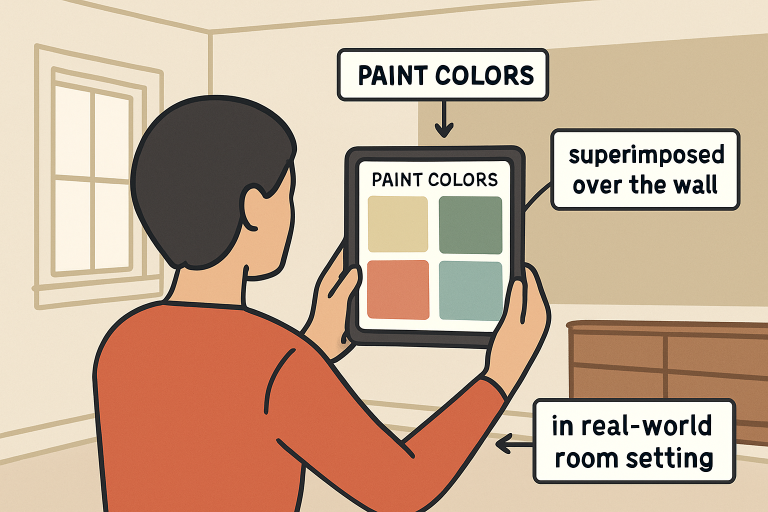
Modern paint visualization tools harness augmented reality to deliver stunningly realistic previews. Using your mobile device’s camera, these apps detect the boundaries of walls—indoors or out—and superimpose your chosen paint color over them in real time. Top tools offer not just static images but dynamic, interactive previews that react to the unique lighting and angles of your space. The technology can account for shadows, furniture placement, and even varying daylight throughout the day, giving you a true-to-life impression of your finished painting project.
Benefits of Using Paint Visualization Tools
- Confidence in Color Selection: Visualizing colors in your actual space helps you make informed decisions, reducing the likelihood of dissatisfaction.
- Time and Cost Efficiency: By narrowing down choices virtually, you save time and money on purchasing and testing multiple paint samples.
- Experimentation with Bold Choices: These tools encourage trying bold or unconventional colors without the commitment, fostering creativity in home design.
Popular Paint Visualization Apps
With a surge of user-friendly apps on the market, finding one that suits your needs is easier than ever. Here are some of the most innovative options for homeowners:
- Sherwin-Williams ColorSnap® Visualizer: This app features the Instant Paint™ experience and enables users to apply over 1,500 Sherwin-Williams hues to rooms or exteriors with remarkable realism. It’s available for both iOS and Android devices and allows users to create palettes, search for color matches, and share visualizations easily.
- Paint AI – Color Visualizer: This AI-driven option from ReImage AI lets you explore interior and exterior color schemes with authentic paint matches. Its simple interface and precision make it a favorite for fast experimentation. Discover more about Paint AI.
Tips for Effective Use of Paint Visualization Tools
- Ensure Proper Lighting: Good lighting produces the most realistic digital color overlays. For the best match, try using the app in natural daylight and supplementing with indoor lights as necessary.
- Calibrate Your Device: Some apps recommend calibrating your phone or tablet’s camera for more accurate color simulation. Always follow in-app setup guides to maximize results.
- Compare Multiple Colors: Before committing to a hue, compare a handful of options—sometimes seeing shades side by side is the only way to spot your favorite.
- Share with Others: Most visualization tools offer sharing or saving features. Show your visualizations to friends, family, or design professionals to get feedback and build consensus on your choices.
Considerations Before Choosing a Paint Color
Paint visualization tools are powerful, but don’t skip these essential considerations to guarantee satisfaction with your final decision:
- Room Lighting: Colors transform as the light changes. Make a habit of viewing your visualized colors in both daylight and artificial lighting to spot any unwanted shifts in tone.
- Room Size: Lighter shades can open up small rooms, while deeper hues make spacious areas feel cozier and more inviting.
- Existing Décor: A harmonious home starts with complementary tones. Assess how your paint colors interact with fixed elements like floors, cabinets, trim, and furnishings.
Conclusion
Instant paint visualization tools have transformed home painting projects, turning color selection from a stressful chore into a creative, confident process. By offering realistic, personalized previews and expansive color libraries, these digital solutions empower homeowners to create spaces they love—inside and out. Whether you’re braving a bold new hue or fine-tuning curb appeal with an exterior house paint visualizer, technology has made it possible to reimagine your home with ease. Start exploring and discover the perfect shade to bring your vision to life.
- Understanding Plumbing Challenges and Solutions in Rogers, Arkansas - July 24, 2026
- Dental Implants in Rapid City, SD: Restoring Smiles for the Community - July 24, 2026
- Innovative Vision Solutions for the Modern Era - July 22, 2026


